



If your traffic dipped and your site feels messy, content pruning can be one of the quickest ways to restore clarity. Small business sites collect baggage: old posts, duplicated location and service blurbs, thin pages that never earned rankings, and near-identical pages that compete with each other.
Pruning isn’t about deleting half your site. It’s about keeping the pages that deserve to exist and making the rest pull their weight, or getting them out of the way.
When pruning helps (and when it backfires)
Signs your site is bloated
Pruning tends to help when you see a mix of these:
- Lots of pages with low impressions, no clicks, and no clear purpose
- Several pages targeting the same query, causing cannibalization
- Old posts that used to rank but have slid over time (content decay)
- Template pages with barely any unique value (thin content)
- Navigation and internal linking that feels accidental rather than intentional
When not to prune yet
Pruning backfires when you treat it like spring cleaning without data. Hold off if:
- You don’t have a clean inventory of what exists, what it’s for, and how it performs
- You’re in the middle of a redesign or URL restructure
- You’re planning to delete pages that still serve a real customer need, even if they don’t drive SEO traffic
A simple goal helps: fewer “why does this page exist?” URLs, more pages that satisfy intent.
What to do first: build a pruning inventory
Before you touch a single URL:
- Export a full URL list for your site
- Add columns for: page type, primary query and intent, impressions, clicks, conversions or leads, last updated date, and notes
- Decide an action per URL: keep, improve, merge, or remove
If you want a structured way to build that inventory fast, use our SEO audit checklist for small businesses as your baseline before you start cutting or merging anything.
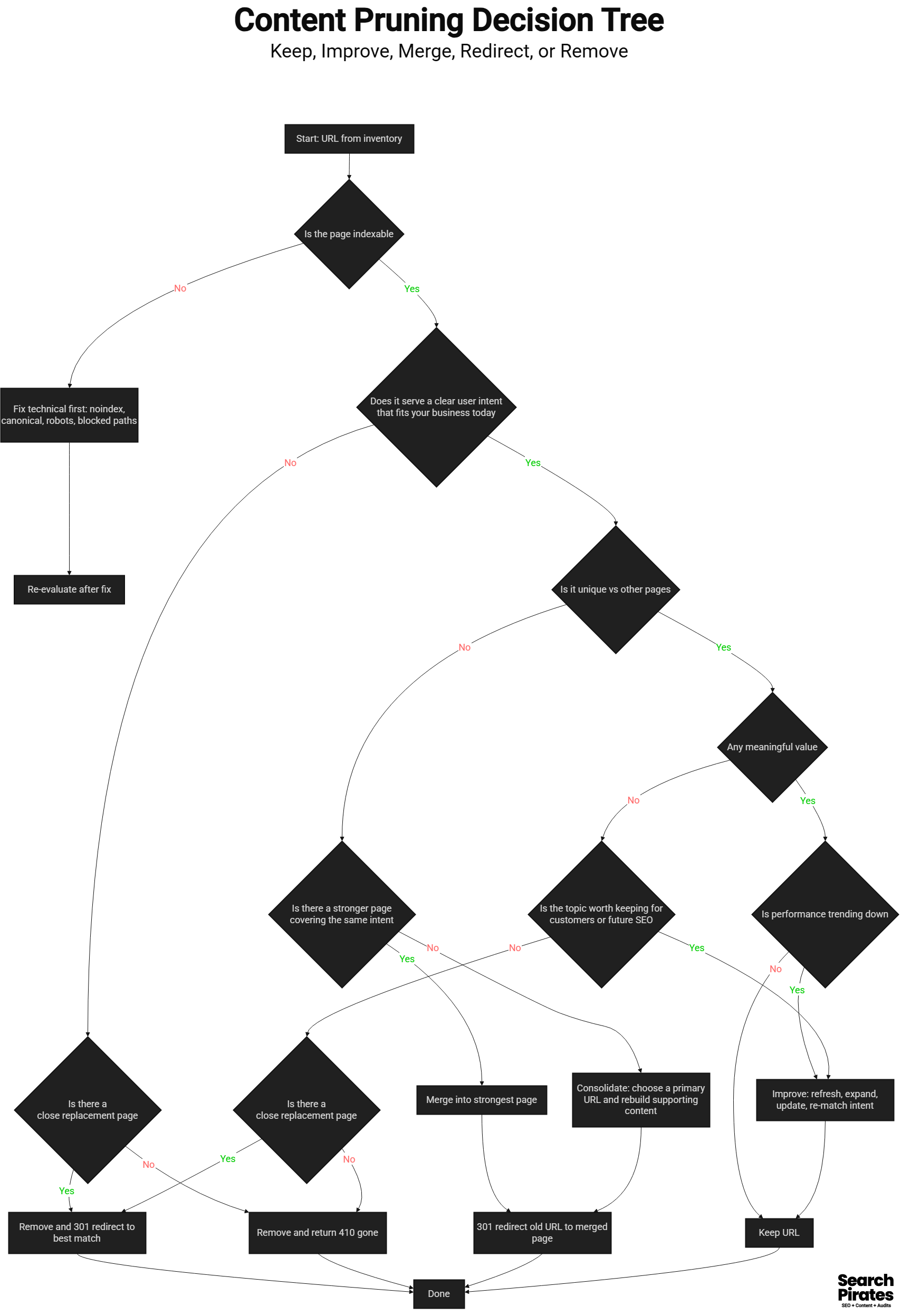
The 4 actions: keep, improve, merge, remove
Every URL gets one action. That’s what stops this from turning into a vague content audit that never ships.
1) Keep
Keep pages that already do their job:
- They rank for something meaningful or bring qualified visits
- They convert or assist conversions
- They match a distinct intent, not “kind of like” another page
- They fit naturally in your site structure and internal linking
Rule of thumb: if you would genuinely miss the page for customers or sales, it’s likely a keep.
2) Improve
Improve when the page is a good topic but the execution is weak. Typical cases:
- The page targets the right query but doesn’t answer it clearly
- It’s thin content that could be made genuinely useful
- It’s outdated or missing key context
- It gets impressions but low clicks, suggesting a title or intent mismatch
What improving often looks like:
- Rewrite the intro so it answers the query in the first few lines
- Add missing sections that users expect
- Include a few concrete examples or scenarios
- Refresh screenshots, steps, or recommendations
- Update old content that’s still relevant but stale
In audits, we often see “almost good” pages that only need a clearer angle and a better match to intent, not a full rewrite. If the “improve” pile is bigger than you expected, content management helps you keep updates moving so refreshed pages don’t sit half-done for months.
3) Merge
Merge when you have multiple pages competing for the same job. This is where pruning becomes a growth move, not a cleanup chore.
Common merge scenarios:
- Three short blog posts that should have been one stronger guide
- Multiple service pages that overlap heavily
- Location pages that are mostly duplicate text
How to merge blog posts without losing value:
- Pick a primary URL as the destination page
- Combine the best parts from the supporting pages
- Rework the structure so it reads like one coherent piece
- Add a “what’s new” section if the topic has evolved
- Redirect the old URLs to the primary page
Micro-example: you have three posts titled “SEO checklist,” “SEO basics,” and “SEO tips for beginners,” all thin and overlapping. Merge them into one clear beginner guide, keep the best examples, and redirect the other two posts to the merged guide.
This is also where “consolidate content” matters. You’re not deleting knowledge, you’re concentrating it into fewer, stronger pages.
4) Remove
Remove when the page has no real purpose and no realistic path to becoming useful.
Candidates:
- Pages with zero meaningful impressions over a long period
- Posts that were written for a trend that no longer exists
- Boilerplate pages that add no unique value
- Duplicate pages created by tags, filters, or platform quirks
You have two removal options:
- Delete and return 410 if there’s no relevant replacement
- Redirect old URLs when there is a clear, relevant destination
Avoid redirecting everything to the homepage. That often creates a poor user experience and can look like a soft 404 pattern.
Redirect map basics: how not to break things
A 301 redirect map is just a list of old URLs and the best new destination for each.
Basic rules:
- Redirect to the closest match, not the closest guess
- Avoid redirect chains, meaning A to B to C
- Don’t redirect everything to the homepage
- Keep a record so you can audit it later
When to use what:
- 301 redirect when the content moved to a better page
- 410 when the content is gone and has no replacement
- Leave it alone when the page is fine and you’re only updating the content
If you do a lot of merging and deleting in one go, test a handful of old URLs manually to confirm they land where you intended.
A lightweight pruning workflow you can repeat quarterly
Here’s a simple repeatable process for content pruning for SEO:
- Pull a URL inventory and performance data
- Tag each URL with one action: keep, improve, merge, remove
- Do merges first so you know the destination pages
- Write your redirect map and implement redirects
- Update internal links pointing to retired URLs
- Re-submit key pages for indexing if needed
- Track results for 4–8 weeks, then adjust
Once the clutter is gone, the next win is consistency, so use this SEO content calendar for small business to plan what to publish next and keep the site growing. And if you want someone to own the quarterly pruning cycle, rankings checks, and measurement, our SEO management service is built around that kind of ongoing maintenance.
What most people get wrong
- They delete pages without checking if they still convert or assist conversions
- They redirect everything to one page and create a mess of irrelevant redirects
- They prune and publish nothing, so the site gets “cleaner” but doesn’t grow
Quick wins vs bigger projects
Quick wins:
- Delete obvious low quality pages with no performance and no purpose
- Refresh a handful of decayed posts that used to rank
- Merge two overlapping posts into one stronger page
Bigger projects:
- Consolidating a messy location or service page set
- Rebuilding internal linking across a pruned site
- Reworking your blog category strategy so new thin pages stop appearing
Conclusion
Content pruning is not about having fewer pages. It’s about having fewer weak pages and more pages that deserve to rank. Start with a clear content audit inventory, use the keep, improve, merge, remove rules, and treat redirects like part of the content work, not an afterthought.
If you repeat the workflow quarterly, your site stays lean, your internal linking stays sane, and you spend more time improving winners instead of maintaining clutter.